One screen.
Every time zone.
No tabs, no settings maze. Your cities fill the screen, the ruler sits under your thumb.

World clocks you can drag through time
Live demo · your local timeStack the cities you care about, drag one ruler, and every clock shifts together. Find the hour that works for every city on your list without doing time-zone maths.
This is the real idea, running in your browser. The app does it with haptics.
No tabs, no settings maze. Your cities fill the screen, the ruler sits under your thumb.
Everything you need to work with people in other time zones, and nothing you don't.
Drag up to 24 hours either way. Snaps to 15 minutes and clicks a haptic tick on every hour.
Night, dawn, day and dusk colour each row, with a sun or moon gliding across as you scrub.
Your current time zone is pinned as the baseline and follows you when you travel.
Pick 2:00 am New York and see exactly when that rings on your phone. A real alarm on iOS 26, even in silent mode.
Badges show when a city is on a different day, and warn you two weeks before clocks change.
About 200 extra city names (Shenzhen, Boston, Munich…) on top of every iOS time zone.
Slide a row left to remove it, with Undo if you slip. Drag the grip to reorder. Every change saves straight away.
Small, medium and large Home Screen widgets, plus Lock Screen. The large one has −1h · Now · +1h buttons.
No accounts, no server, no analytics. Your cities live on your device.
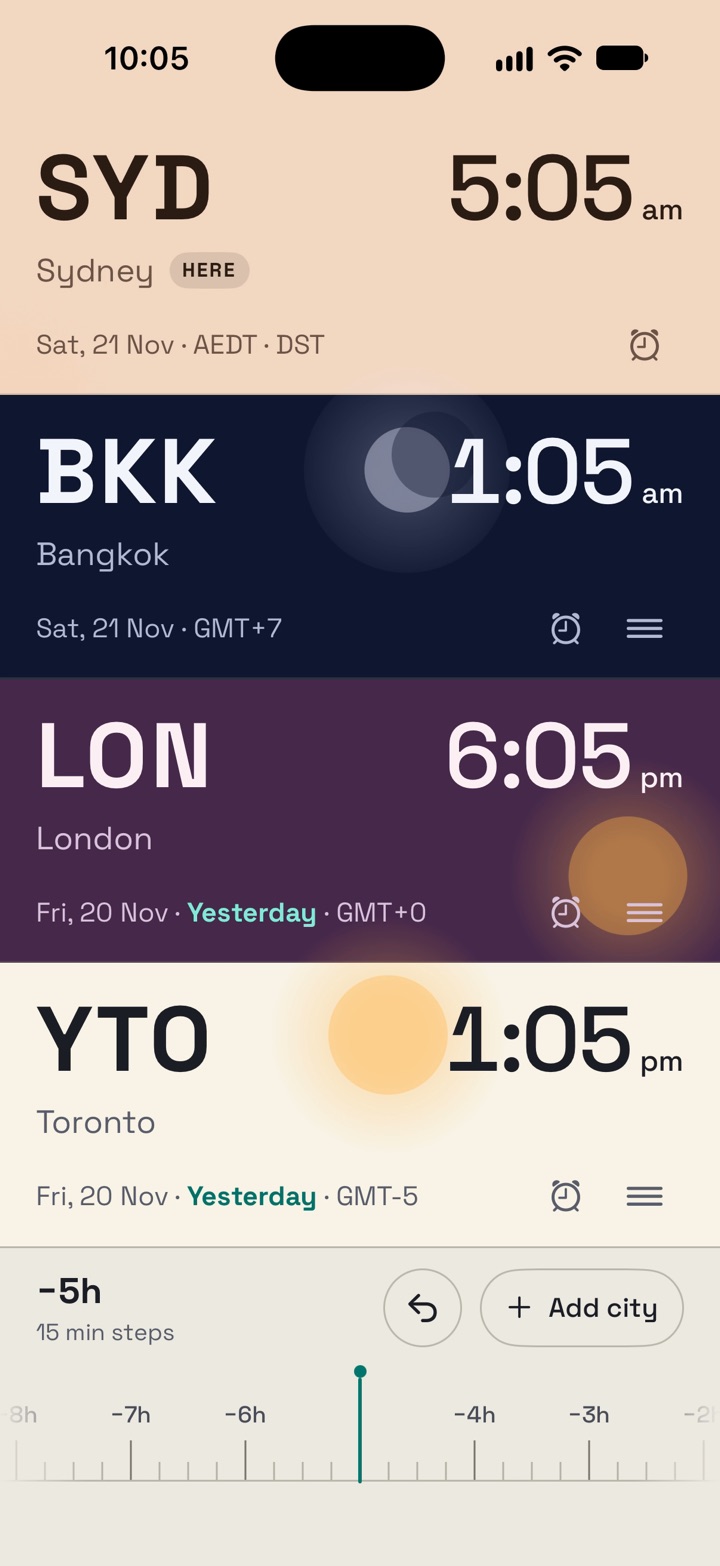
Your city stays on top, tagged HERE
Each row wears its city's sky
Drag ±24 hours, snapped to 15 minutes
Yesterday and Tomorrow when dates differ
One drag moved every clock −5h
Proposing a call for 9 am your time? Slide the ruler and watch every row update together. The colours tell you instantly who's asleep.
Every row takes the colour of that city's sky right now, so you can see at a glance whether it's a good time to call.

Pick the time on their clock
See when it rings on yours
Tap the bell on any city, pick a time on their clock, and Skyhour shows exactly when it will ring on your phone, and how long until then.
Pick which cities each widget shows. The large widget lets you nudge time an hour either way, right from the Home Screen.
Rendered here from the widgets' real layouts, using your local time. Every city takes the colour of its own sky.
Skyhour works entirely on your device. There's nothing to sign up for and nothing phoning home.
Skyhour is free, with no ads and no in-app purchases.
iPhone and iPad running iOS 17 or later. Real alarms (full screen, ring in silent mode) need iOS 26; on iOS 17–18 alarms arrive as notifications with sound.
All the maths goes through Apple's own time-zone database, so DST gaps and overlaps come out right. Rows show a DST tag, and a “DST starts / ends” note when a change is within two weeks.
Yes. Search knows about 200 extra city names that share a zone with a bigger city, like Shenzhen (Shanghai time) or Boston (New York time), and both can be on screen at once.
No. There are no accounts, no servers and no analytics. Your city list is stored on your device and shared only with your own widgets.
The top row always shows your device's current time zone, tagged HERE. Land in Tokyo and it becomes Tokyo automatically.

Skyhour is free on the App Store. Drag once, and every city you care about moves with you.